How a Driver App Transforms Waste Hauling Operations
The Real Problem: Manual Workflows Kill Productivity
Most waste hauling companies still rely on paper tickets, radio calls, and driver memory to track pickups and deliveries. When a driver completes a stop, they jot down a time, scribble notes, and hope the information makes it back to the office before the end of the day. This analog approach creates bottlenecks: dispatch doesn't know why a route is running late, customers don't hear back until hours later, and billing gets held up waiting for confirmation that a service actually happened.
The cost of this inefficiency compounds quickly. A driver spending five minutes per stop writing notes, hunting for the right ticket, or waiting for radio confirmation on 20 stops per day loses nearly two hours of productive time. Over a month, that's 40+ hours of wasted labor—time that could have been spent completing additional stops or servicing more customers. A mobile driver app eliminates these friction points by automating the data capture, photo documentation, and status communication that currently lives in a file cabinet or a radio conversation.
Real-Time Status Updates Keep Dispatch and Customers Aligned
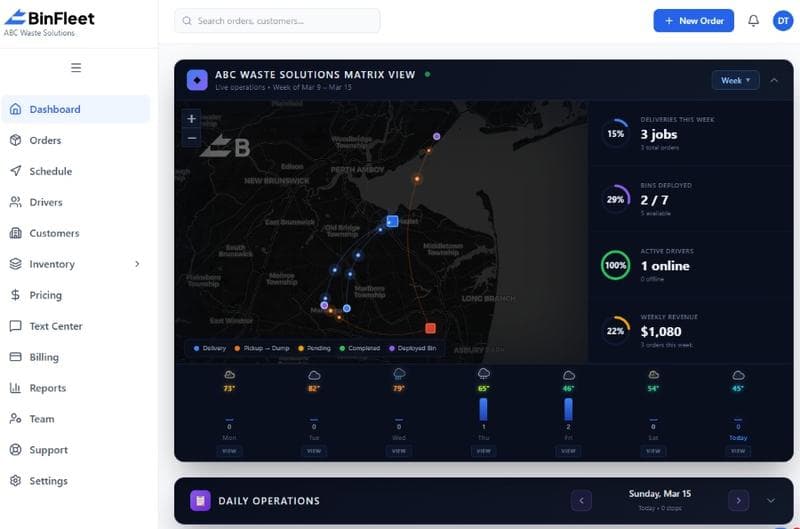
When a driver can mark a stop as started, in progress, or complete with a single tap, dispatch gets instant visibility into route progress. No more guessing whether a delay is coming or how far behind schedule the crew really is. This real-time feedback lets dispatch proactively call customers if a stop will run late, adjust the next day's route based on actual completion times, or reassign work if a driver falls too far behind. The driver app becomes the single source of truth for what's happening on the road, eliminating conflicting information and reducing phone tag between the field and office.
Customers feel the difference immediately. Instead of calling the dispatch office to ask "where's my bin," they receive automated SMS or push notifications showing the driver is on the way, currently at their location, or finished for the day. This transparency builds trust and reduces complaint volume. For drivers, the app removes the need to radio back status updates or answer repeated "where are you" questions—they work in focused intervals on their route while the system handles communication for them.
Photographic Proof Eliminates Billing Disputes and Liability Risk
One of the highest-friction points in waste hauling is proving a service was performed. A customer claims their bin was never picked up; a driver says he got there but the gate was locked. Without documentation, the dispute becomes a he-said-she-said. A driver app with integrated photo capture solves this by requiring (or encouraging) the driver to snap a photo at each stop as proof of work. That photo gets timestamped, geolocated, and linked to the service record in seconds—no extra steps, no remembering to download files later.
This matters for more than just customer disputes. Photos provide liability protection when a customer claims property damage, help compliance audits show work was completed, and give dispatchers real-time visual confirmation that a roll-off box was actually swapped rather than just assumed. From a billing perspective, photographic proof means invoices get paid faster because customers can clearly see their service was performed. For drivers, the app makes it effortless—photo capture is built into the workflow, not bolted on as an afterthought.
Streamlined Stop Management Reduces Driver Stress and Errors
A driver app organizes the day's work into a clear, sequential list of stops. Each stop shows the customer address, service type, notes from dispatch, special instructions, and any photos or history from previous visits. The driver taps into each stop, confirms details, captures required photos, and marks it complete—all in the same app. There's no shuffling through physical tickets, no confusion about which stop comes next, and no risk of missing a stop because it got buried in the stack. This structure is especially valuable for newer drivers who need clear guidance, but it also reduces cognitive load for experienced operators who can focus on safe driving rather than route logistics.
When a driver encounters a problem—a locked gate, a customer complaint, or an unsafe container—the app lets them add a note, attach a photo, flag the stop for follow-up, or contact dispatch immediately without hanging up on the radio. Dispatch gets notified in real time and can respond by adjusting the route, calling the customer, or scheduling a callback. This two-way communication loop prevents small problems from cascading into major delays or service failures, and it documents the reason for any incomplete stops or rescheduled work.
Integration with Dispatch and Billing Closes the Loop
A driver app that's disconnected from the rest of your operation is just a notepad. The real power comes when driver data flows automatically into your dispatch system, billing platform, and customer communication tools. When a driver completes a stop with a photo and timestamp, that data instantly updates the service record, marks the invoice as verified, and triggers a customer confirmation SMS—all without manual data entry or the next-day office scramble to match photos with tickets.
This integration also creates a feedback loop that improves operations over time. Dispatch sees which stops consistently run late and why; management can identify routes that need adjusting or drivers who need coaching; and billing gets a complete audit trail of work performed. For haulers running BinFleet or similar software, the driver app is the mobile extension of your entire operation—not a separate tool. This eliminates duplicate data entry, reduces errors, and gives every team member access to the same real-time information whether they're in the truck or the office.
Why 2026 Haulers Can't Afford to Skip This Step
By 2026, customer expectations for transparency and speed have shifted significantly. Customers tracking Amazon deliveries and Uber drivers expect the same visibility from their waste hauler. Drivers who've used consumer mobile apps won't accept clunky interfaces or inefficient workflows—they want tools that work as well as the apps they use in their personal lives. Operators who still rely on paper, radio, and end-of-day data entry won't just be slower; they'll struggle to retain both customers and quality drivers who see better options elsewhere.
The operational case is equally compelling. A well-designed driver app eliminates hours of wasted time per week, prevents billing disputes, reduces customer complaints, and creates the operational visibility that leads to better routing and more pickups per day. For a 10-truck operation running 20 stops per day, even a 10 percent improvement in efficiency translates to completing an extra 20 stops per week—that's real revenue growth without adding headcount.
Getting Started with a Driver App
If your current workflow still relies heavily on paper tickets, radio updates, and manual data entry, a driver app is one of the highest-impact investments you can make. Start by mapping out exactly what information your drivers need at each stop and what data you need back from them—address, service type, yes/no completion, photos, notes, customer signature, or other specifics. Look for a platform that integrates driver data with your dispatch and billing systems so there's no redundant data entry.
The best driver apps are intuitive enough that drivers pick them up quickly without extensive training, reliable enough to work in spotty cell coverage, and thoughtfully designed to speed up the actual work instead of adding steps. See how BinFleet's driver app works in action, or check out more articles on waste hauling operations to understand what other operators prioritize when choosing mobile tools. The right app won't just make drivers happier—it'll transform how your entire operation runs.
FAQ: Driver App Questions Waste Haulers Ask
Do drivers actually use the app if it's not mandatory?
When an app genuinely makes a driver's day easier—fewer tickets to juggle, clearer instructions, faster checkout—adoption is high. That said, most well-run operations make photo or status capture a job requirement, not optional. The key is choosing an app smooth enough that compliance feels natural rather than punitive.
What if drivers have spotty cell service in rural areas?
A good driver app works offline: drivers can mark stops complete, add notes, and capture photos even without signal. Once connectivity returns, all data syncs automatically. This matters hugely for rural haulers and companies working in areas with dead zones.
How long does it take to train drivers on a new app?
Intuitive apps require 15-30 minutes of hands-on training per driver, plus a few days of real-world adjustment. Poorly designed apps can take much longer and generate frustration. Prioritize user experience and make time for support in the first week of rollout.
Can the app work on older phones or tablets?
Most modern driver apps run on Android and iOS devices from the last 4-5 years. If your drivers use very old hardware, confirm compatibility with the vendor before committing. For most operations, providing a modest tablet or approving driver phone reimbursement is cheaper than losing the efficiency gains.
Ready to Streamline Your Operation?
See how BinFleet AI helps waste haulers save time, cut costs, and grow.
Request a Free 30-Day TrialRelated Articles
How a Mobile Driver App Transforms Waste Hauling Operations
Driver Apps for Waste Haulers: How Mobile Technology Transforms Daily Operations