How a Mobile Driver App Transforms Waste Hauling Operations
Why Mobile Apps Matter in Waste Hauling
Waste hauling operations live or die on execution. A driver finishes a pickup, but did they photograph the site? Was the bin actually empty? Did the customer know they were coming? These gaps create disputes, rework, and lost revenue. Without a driver app, your team relies on memory, handwritten notes, or photos dumped into email threads—none of which integrate into your billing or customer communication systems.
A purpose-built driver app closes these gaps. It gives every driver a single source of truth for their route, automatic timestamps for each stop, photo evidence of service, and one-tap customer notifications. The data flows straight into your back office, eliminating manual data entry and the errors that come with it. Suddenly, you have complete visibility into what happened at every address, and your customers have proof that service was delivered.
Real-Time Route Execution and Stop Validation
When a driver opens the app at the start of their shift, they see their route mapped with color-coded stops, addresses, account notes, and any special instructions. GPS automatically validates when they arrive at each location, eliminating guesswork about whether they actually showed up. The app won't let them mark a stop complete without confirming the right address and bin, which prevents skipped pickups and billing mix-ups.
This validation layer is especially critical for bulk hauls or multi-day routes where drivers juggle dozens of stops. Instead of relying on verbal updates or manual position tracking, dispatchers can watch route progress in real time. If a driver gets stuck in traffic or a customer isn't home, the app flags it immediately, and a dispatcher can reassign the stop or reschedule the customer without waiting for an end-of-day report. Route accountability becomes automatic.
Photo Proof and Service Documentation
Photographic evidence resolves disputes faster than any explanation. When a driver snaps a photo of a bin, the site condition, or damage during service, that image is instantly time-stamped, geo-tagged, and tied to the specific stop. Customers can't claim service never happened, and you have documented proof if a billing disagreement surfaces. Many drivers also photograph before-and-after conditions, which protects both parties and reduces chargeback requests.
The mobile app makes photo capture frictionless. A driver can take a photo, add a quick note, and submit it without leaving the driver seat. The image uploads automatically when internet is available, so no photos get lost between the field and the office. This documentation also becomes valuable for insurance claims, customer retention (customers see they're getting quality service), and performance reviews. It transforms your operation from word-of-mouth accountability to data-backed accountability.
Status Updates and Customer Notifications
Customers hate uncertainty. They want to know when the truck is arriving, when service is complete, and confirmation that their request was handled. A driver app enables one-tap customer notifications that trigger automatically or on demand. Once a driver completes a stop, the app can send an SMS or push notification to the customer with completion confirmation, photos, and next pickup date—all without the driver typing anything.
This automation reduces missed communication and improves customer satisfaction without adding to your team's workload. A customer receives a notification that their container was collected and will be exchanged tomorrow, so they don't call the office wondering about pickup status. Meanwhile, your dispatchers aren't fielding calls about what's happening at address 142 Main Street. The app handles routine communication at scale, and your team focuses on exceptions and problem-solving.
Eliminating Paperwork and Manual Data Entry
Traditional waste hauling operations rely on drivers writing notes, photographing on personal phones, and verbally reporting issues when they return to the yard. These notes then get transcribed, photos get forwarded manually, and key details get lost or misunderstood. A unified driver app eliminates this workflow entirely. Every stop, photo, and note is captured digitally and flows directly into your dispatch system, accounting software, and customer portal without human transcription.
The time savings compound quickly. A driver that previously spent 15 minutes after their shift relaying information verbally now uploads everything in real time. Your office staff no longer spends an hour each day sorting photos, transcribing notes, and matching them to invoices. That freed-up time translates to faster billing, fewer invoicing errors, and faster response to customer inquiries. For a 10-truck operation, this can save 20+ hours per week in administrative overhead.
Integration with Dispatch and Back-Office Systems
A standalone app that doesn't connect to your dispatch or invoicing system creates as much friction as pen and paper. The best driver apps integrate seamlessly with your routing software, accounting, customer communication, and inventory tracking. When a driver marks a stop complete and uploads photos, that data triggers a new invoice line, updates bin inventory in real time, and notifies the customer—all automatically. Your dispatcher never has to manually close a ticket or re-enter service details.
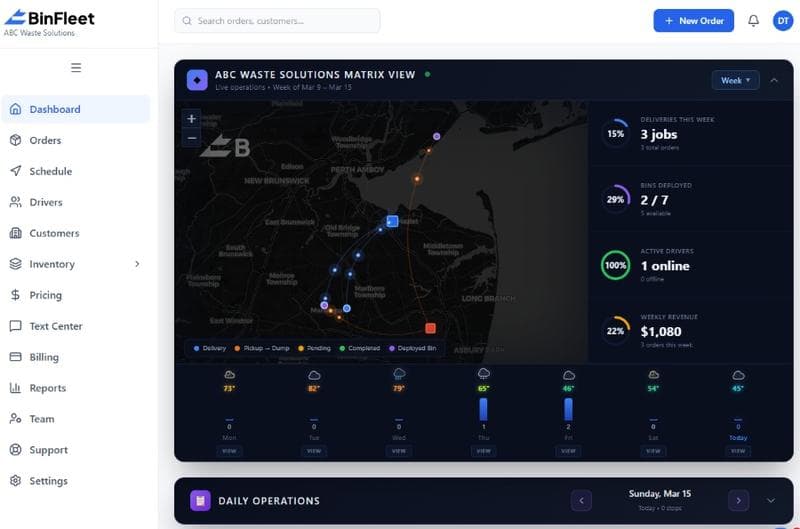
This integration also enables route optimization and dynamic adjustments. If a customer calls with an emergency pickup, the dispatcher can instantly add it to the nearest driver's route, notify the driver through the app, and update the customer on arrival time—all within seconds. The driver sees the new stop on their map, navigates to it, completes service, and the invoice automatically includes it. The entire workflow, from customer request to completed service to payment, stays digital and connected. See how BinFleet integrates driver operations with dispatch and billing to understand what seamless integration looks like in practice.
Building Driver Adoption and Accountability
Technology only works if your drivers actually use it. The best driver apps are intuitive, fast, and reduce friction compared to the old way. If the app is clunky or adds steps, drivers will resist. A well-designed app should feel like an assistant, not a surveillance tool. It saves the driver time by pre-populating addresses, offering one-tap confirmations, and handling customer communication so they don't have to. When drivers see the app making their job easier, adoption accelerates.
Accountability also improves when drivers understand the purpose. A driver who sees that photos eliminate disputes, that on-time updates reduce customer complaints, and that digital records make payroll faster will embrace the tool. Transparency about why the app exists—better service, fewer conflicts, faster pay—builds buy-in. Many operators find that after 30 days of live use, their drivers prefer the app because it eliminates ambiguity about who completed which stops and when.
Frequently Asked Questions
Do drivers need strong cell signal for the app to work?
Most driver apps work in offline mode. The driver can capture stops, photos, and notes without an active connection, and the data syncs to the server when they return to areas with cell coverage or at the end of the shift. This prevents frustration in rural areas or buildings with poor signal. However, real-time customer notifications and instant dispatch updates do require internet connectivity, so ensuring adequate coverage in your service area is worth planning for.
How long does it take to implement a driver app across our fleet?
Setup usually takes 1-2 weeks for configuration and driver training. Your team uploads routes or connects your dispatch software, configures customer notification templates, and sets photo requirements. Drivers then need 30 minutes to an hour of hands-on training to understand the workflow. Most teams see drivers operating independently within a few days. The ramp-up is fast because the interface is built specifically for the task of completing and documenting service stops.
What happens if a driver forgets their phone or it breaks?
Most operations have backup devices at the yard or in a supervisor's truck. A driver can swap to a backup phone, and their route and data sync instantly from the cloud. This redundancy is important for reliability, so planning for 1-2 backup devices per 10 trucks is smart. Paper route sheets also serve as a backup for critical routes, though most teams find the app so reliable that paper backup becomes unnecessary after a few months of operation.
Can the app work with our existing dispatch software?
It depends on the driver app and your current system. Best-in-class driver apps integrate directly with major dispatch and routing platforms via API. If your system has an open API or pre-built integrations available, setup is seamless. If your current software is older or proprietary, you may need a data sync bridge or manual import. During evaluation, confirm integration options with potential vendors. Read more case studies of waste haulers who modernized their tech stack to see real examples of integration approaches.
Ready to Streamline Your Operation?
See how BinFleet AI helps waste haulers save time, cut costs, and grow.
Request a Free 30-Day Trial